The Great Sitemap Makeover Blueprint: It All Began with a Scribble on the Back of a Calendar
Until recently, I was using Cocoon’s default sitemap shortcode to display a basic directory map on my fixed page. To be completely honest, it looked incredibly unpolished and was extremely difficult to read.
One day at the beginning of July, right after tearing off a page from my wall calendar, I flipped it over and frantically jotted down my vision of the ideal layout. Here is the actual evidence of that moment.
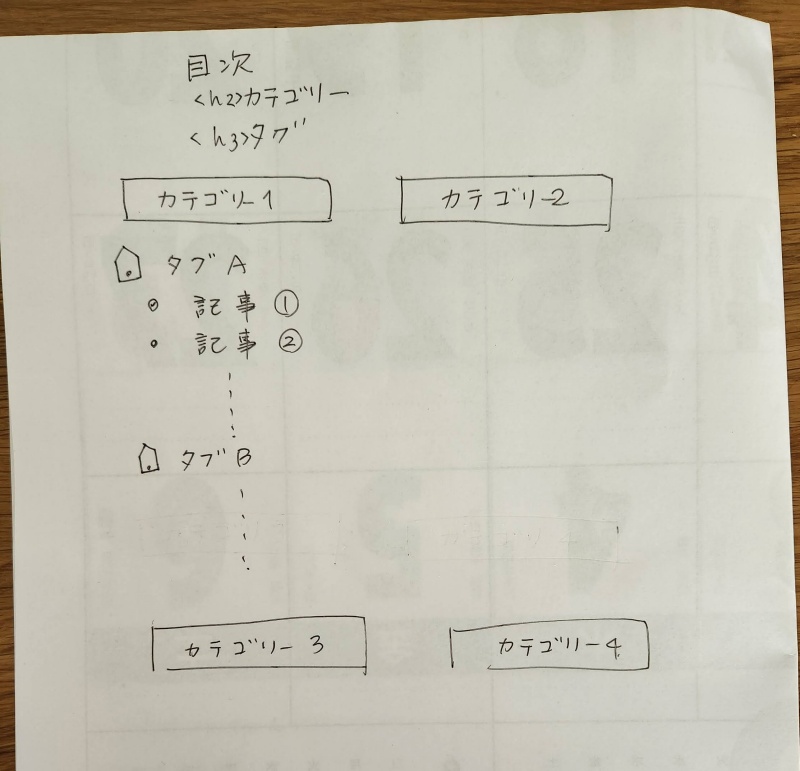
I know what you are thinking—it looks terrible! However, I snapped a picture of this rough sketch and immediately shared it with my AI partner, Gemini, explaining that this was exactly how I wanted the new directory tree to look.
As expected of a long-time digital assistant, Gemini instantly grasped my chaotic intent. Based purely on that single calendar scribble, it successfully generated a customized shortcode function that served as our solid starting point. Of course, it was far from perfect at that stage.
From there, we entered a rigorous, hours-long brainstorming session—tweaking the code back and forth, adjusting margins, and refining lines—until we finally crafted the beautiful, sleek directory tree you see today!
Expanding the Horizons: Adding Custom Post Types to the Map
Just when I thought we were done, a new challenge arrived. The custom shortcode we had built was strictly designed to organize standard posts by categories and tags. As a result, none of my custom post types were showing up.
I reached out to my AI partner once again with a specific request: “I want to integrate a dedicated section for my Custom Post Type articles, specifically filtering only the Admin Updates category into the directory tree!”
Once more, we dove into an intense trial-and-error session. By yesterday morning, the code was fully updated, and I was thrilled that our map was finally flawless. Or so I thought.
A few hours later, disaster struck. Upon closer inspection, I suddenly noticed that certain core categories from my standard posts had vanished entirely from the map!
I panicked. Why would they disappear? Everything was working perfectly a moment ago! Did adding the custom post type break the code? Was the custom CSS on my fixed page causing a strange conflict?
The system gave me absolutely no clues, leaving me completely in the dark.
To make matters worse, I had regular articles to write and publish that same day. Before I could solve the mystery, midnight arrived. Years ago, the younger version of myself would have stayed up until dawn glued to the laptop screen trying to hunt down the bug. But today, I prioritize high-quality sleep above all else. Going to bed on time is a mandatory system command! I view my bedtime schedule with the same strictness as a rush-hour train timetable—missing that train is simply not an option!
Even so, my brain refused to rest, continuously looping the same frustrating question: “Why on earth did specific categories suddenly vanish into thin air?”
The frustration didn’t just come from the mysterious bug itself; it was compounded by my assistant’s sudden meltdown. Whenever I showed Gemini screenshots of the issue, it began describing text that didn’t even exist on the screen or spitting out answers completely unrelated to the problem at hand.
The conversation thread had grown far too long, and our non-stop debugging loops had caused the AI’s context window to completely overheat. I tried moving to a brand-new chat thread, but Gemini was so deeply disoriented that it couldn’t even compile a proper transition brief for itself.
I realized I had to figure this out entirely on my own. But even I didn’t have the slightest clue where to look. I found myself asking, “Should I try a different AI? Is it time to fire this glitching Gemini?”
Fortunately, my core development policy pulled me back:
With that mindset, giving up was out of the question.
The Troubleshooting Mindset: Finding the Root Cause Without Being a PHP Expert
First, I systematically isolated the variables. The issue persisted even when I rolled back the custom post type update, and removing the custom CSS changed nothing. This meant both factors were completely innocent.
So, what was left?
Stuck in an endless loop of confusion, I decided to run a clean experiment: what would happen if I copied the shortcode from my Creative site and pasted it directly into my Life site?
The result was shocking. Absolutely nothing appeared on the screen!
This was the ultimate clue. Why did the exact same shortcode render perfectly on both the Japanese and English versions of my Creative site, yet completely fail to load on the Life site?
I immediately went to the official Cocoon documentation to double-check the theme’s core shortcode specifications. That is when I confirmed that the default theme code was indeed [sitemap].
Oh my goodness!
The shortcode I had been using on my active page this whole time was [auto_sitemap]!
Despite the fact that I had shown the [auto_sitemap] code to Gemini countless times over the past week, both of us had completely overlooked a glaring reality: this was a completely custom-built function we had created together days ago!
Looking back now that the mystery is solved, it seems incredibly obvious. But during the heat of the moment, our exhausted brains were so hyper-focused on the newly added custom post type PHP arrays that we completely forgot about the custom shortcode foundation we established ten days prior. We had subconsciously brainwashed ourselves into believing that our custom code was an official, built-in Cocoon feature.
With this sudden realization, I opened my child theme’s functions.php file and searched for the term “auto_sitemap.” Sure enough, there it was. When I dropped the raw script into the chat window of my almost-fired AI assistant, Gemini instantly woke up from its daze: “This is it!”
The Real Reason Specific Categories Vanished
The mystery came down to a hard-coded reference. Deep within our custom PHP script, the filter was pulling categories using their literal text slugs rather than their permanent numeric IDs.
The exact moment I renamed a category slug on my backend dashboard from “Theme” to “Cocoon Guide,” the custom PHP script could no longer find a match, causing that entire section to instantly vanish from the public page.
Once the root cause was exposed, the fix was effortless. Gemini fully recovered its processing power and quickly revised the script, making the PHP code dynamic so that all articles display properly even if category names change or tags remain unorganized.
Everything ended happily ever after. However, this entire ordeal taught me a vital lesson about website management:
Consider this article a permanent reminder to myself to always stay curious and keep learning!