![[For Beginners] How to Add a Popular Posts Carousel in Cocoon (Free WordPress Theme) Without Plugins](https://martto.net/en/wp-content/uploads/2026/07/carousel_en.png "[For Beginners] How to Add a Popular Posts Carousel in Cocoon (Free WordPress Theme) Without Plugins")
Why Can the Cocoon Theme Display a Popular Posts Carousel Without Plugins?
Have you ever wanted to set up a beautiful, horizontal scrolling article slider (carousel) like the ones often seen in paid themes?
Usually, with standard free WordPress themes, you’d need two plugins: one to track page views and another to display the slider. This tends to make your site heavy and slow.
However, Cocoon is equipped with its own built-in access tracking and carousel features. It has monster-level potential because it operates completely free and incredibly fast.
In other words, with the Cocoon theme, you don’t need heavy plugins or complicated settings. Just check a few standard options, and you can easily display a popular posts carousel in a prominent place on your site!
If you follow this article, you can complete the setup and placement without hesitation in just 3 minutes. Let’s do it together!
How to Enable the Access Tracking Feature in WordPress Cocoon
First, let’s do the initial preparation to track your popular posts.
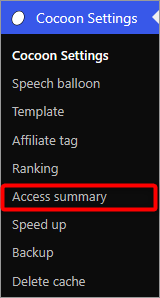
- From the left menu in your WordPress dashboard, open “Cocoon Settings” and select the “Access summary” tab.
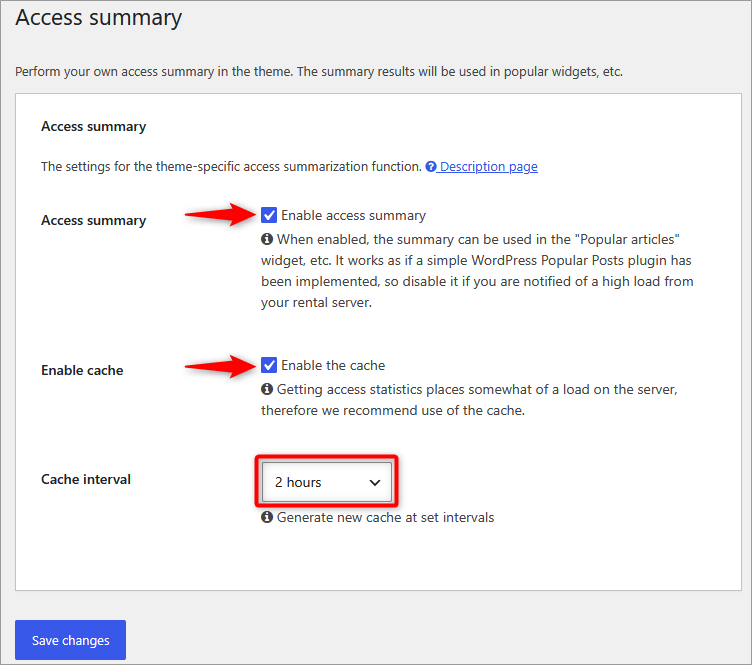
- Once the settings screen opens, check the boxes for “Enable access summary ” and “Enable the cache”, then save your changes.
[Good to Know] Server Load and How to Choose the Right “Cache” Settings
When you open Cocoon’s access tracking, you might feel a bit anxious seeing somewhat technical terms like “server load” or “cache”. We’ve compiled a guide for beginners so you can choose your settings with peace of mind!
Q. Will it make my server slow or heavy?
A. If you run a standard personal blog, you have absolutely nothing to worry about!
If you are using a modern, high-performance rental server, the processing power is very high, so it will run smoothly. Unless you are managing a massive site with over 500,000 monthly page views, or you receive a direct warning from your hosting company about “high server load,” you can confidently set it to “Enable.”
Q. Which “Cache” and “Cache Update Interval” should I choose?
A cache is a magical feature that temporarily memorizes the data of your popular articles and instantly shows that memo to the next reader, making your site load blazing fast. Therefore, it is perfectly fine to leave it “Enabled” as a basic rule!
What might confuse you is how to choose the “Cache Update Interval” (when to refresh the data). If you choose based on the following guidelines, you won’t make a mistake.
🔵 10 Minutes – 30 Minutes: Ideal for trend blogs where an article is going viral on social media right now, and you want to reflect the latest popular posts in the ranking as quickly as possible.
🔴 1 Day – 1 Week: Best for sites with calm traffic patterns or specialized blogs focused on evergreen content.
If you don’t have a specific preference, setting it around “2 hours” is the safest choice to start!
Setting Up the Popular Posts Slider in the Cocoon Carousel Menu
Once the tracking is ready, the next step is the slider display settings.
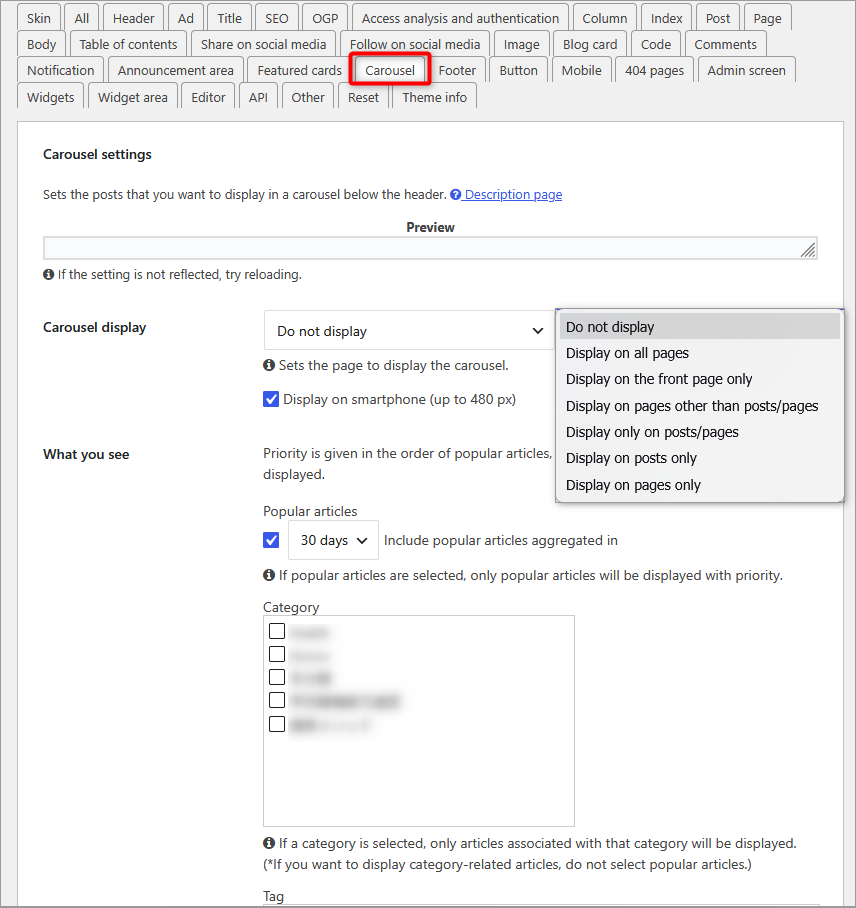
From the same “Cocoon Settings,” please open the “Carousel” tab this time.
In [Carousel Display], you can choose which pages it appears on. Being able to flexibly select only the pages you want your readers to see, such as “All pages” or “Front page only,” is a great feature!
Under [Display Content], check “Popular posts aggregated over ◯◯ days” and select your preferred “Period.”
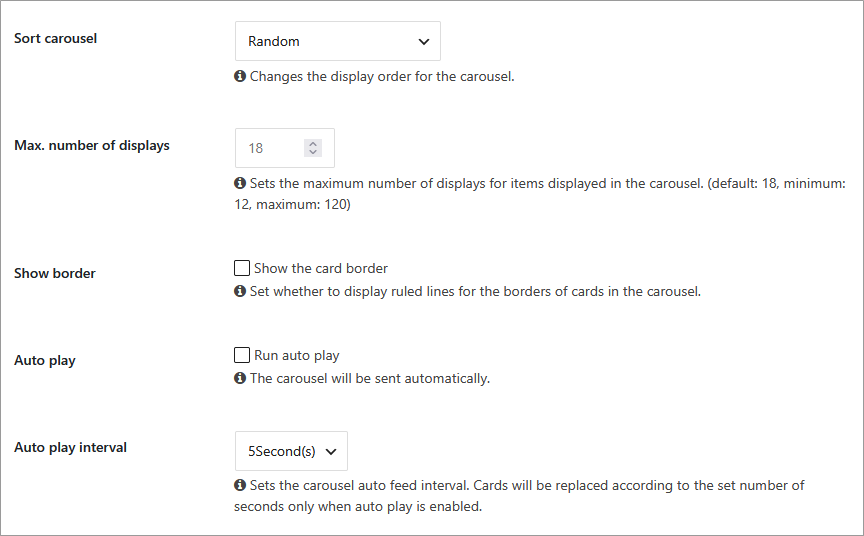
Here, you can also adjust major settings like the maximum number of items to display and autoplay (automatic scrolling) to your liking.
How to Display Cocoon Popular Posts as a Sidebar Widget
After you finish the settings, open the top page of your site and check if the completed carousel is working as configured!
It’s truly amazing what Cocoon’s features can do without needing a plugin, right?
Furthermore, by enabling access tracking this time, it becomes possible not only to display a carousel but also to easily display a “Popular Posts List” as a widget and place it in your sidebar!
Navigate to Appearance ➔ Widgets ➔ [C] Popular articles, and place it in your preferred location!
![Cocoon [C] popular posts widget settings screen](https://martto.net/en/wp-content/uploads/2026/07/screenshot_1718.png)

Comments