Reviving “Maroyaka WebClap” for Modern WordPress
“Maroyaka WebClap for WordPress” was a plugin originally created by tisa of Maroyaka PHP. After the original developer’s website shut down, I dug up an old version of the plugin files and modified them so that the plugin would work with current versions of WordPress. That was on August 15.
Come to think of it, before I redesigned my website, I had installed the old “Maroyaka WebClap” plugin back when it was still working. At one point, my site came under an intense attack, apparently due to a security vulnerability in the plugin. That experience led me to remove it from the site completely.
So when I brought it back, I made sure to strengthen the security, fix the bugs, and rebuild Maroyaka WebClap into a modern version.
Version 2.1.2 is still available on my site, but I continued improving it after that, and in fact, I even completed version 3.0.0.
Could I Turn It Into an Official WordPress Plugin?
At that point, I started wondering: if I had already come this far, could I actually submit it as an official WordPress plugin? So I asked AI about it, and it looked into the requirements for me.
That was when I first learned that, in order to register a plugin in the official WordPress Plugin Directory, you need to be able to clearly explain the licensing and ownership of the code, images, and other assets included in the plugin.
WordPress plugins must be released under a GPL-compatible license.
The problem was that the “Maroyaka WebClap” I had been modifying was originally an old plugin created by tisa. The original website had already shut down, and I had no way to contact the author and confirm the licensing terms.
In other words, if someone asked me, “What license was this code originally released under?” or “Can you prove from the materials available today that you have permission to modify and redistribute it?”, I had nothing in hand that could clearly establish that.
Distributing something on my own website with the explanation, “I repaired an old plugin so that it works with modern WordPress,” is one thing. Submitting it to the official WordPress Plugin Directory as the plugin author is another.
Well, that was a problem.
After going all the way to version 3.0.0, was it going to end up remaining an unofficial plugin after all?
That certainly sounds like where the story was headed, doesn’t it?
But I am pretty quick to change direction 😂
Almost immediately, the conversation shifted to: “Then why not stop using the Maroyaka WebClap code altogether and build the features I actually want from scratch?”
A clap button.
A way to record how many times it has been clicked.
A short message feature.
An admin screen where I can check the clap history.
What I wanted was not the Maroyaka WebClap source code itself. I wanted the functionality.
And if that was the case, there was no reason to inherit the old code.
So I decided to rebuild everything from scratch as a completely new plugin.
I changed the name too.
Friendly Clap Button
Not “WebClap,” but “Clap Button.”
What had started as an attempt to modernize an old plugin had somehow turned into developing an entirely new WordPress plugin of my own.
At the beginning of August, all I had wanted to do was “bring back that nostalgic old plugin.”
How did this happen? 😂
But this was where the real development began.
Entering Beta-Version Hell
If I was going to build something new, I did not want it to work only on Japanese-language sites. I wanted it to work naturally in English-language WordPress environments too.
As I kept adding the features I needed, what had started as “I just want to make a clap button” quickly turned into full-fledged plugin development.
And simply getting it to work was not enough.
If I wanted to release it as an official WordPress plugin, it could not merely look like it was functioning properly. Security, database handling, input validation, translation support, cleanup during uninstall, and many other details all had to follow WordPress best practices.
If it did not work, I fixed it.
If it worked but was awkward to use, I fixed it.
If I did not like the way it looked, I fixed it again.
I installed each beta build on both Japanese and English WordPress environments, tested it in actual use, found bugs or little things that bothered me, and then revised it again.
Button size, the message popup, the check icon, mobile clipping, shortcode spacing, disappearing buttons on custom post types, synchronization between multiple buttons, the statistics screen, time zones, tooltips…
Fix one thing, and something else would catch my attention.
Fix it, install it, test it, and fix it again.
I repeated that cycle dozens of times.
I deleted older beta builds as I went, so at some point I completely lost track of how many versions I had made. In the end, I reached beta build number 56.
Fifty-six.
Looking back, I think I did pretty well to stick with it all the way to the end without giving up(笑)
My Battle With Plugin Check
Once the main features were finally in place, it was time to face a check that is hard to avoid if you are aiming for the official WordPress Plugin Directory.
Plugin Check.
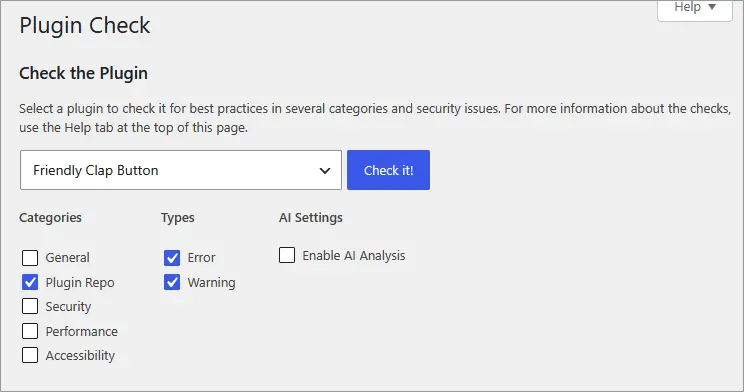
At first, even with only these three check categories enabled, Plugin Check reported two errors and 90 warnings.
That was where I started, but by the time I was ready to submit the plugin officially, I had managed to get both the error count and warning count down to zero.
Finally Submitted to the Official WordPress Plugin Directory
And then, at last, I completed the submission to the official Plugin Directory. Now I am waiting for a response.
There were 197 plugins in the queue when I submitted mine, but instead of moving forward, the queue has somehow grown to 416 plugins 💦
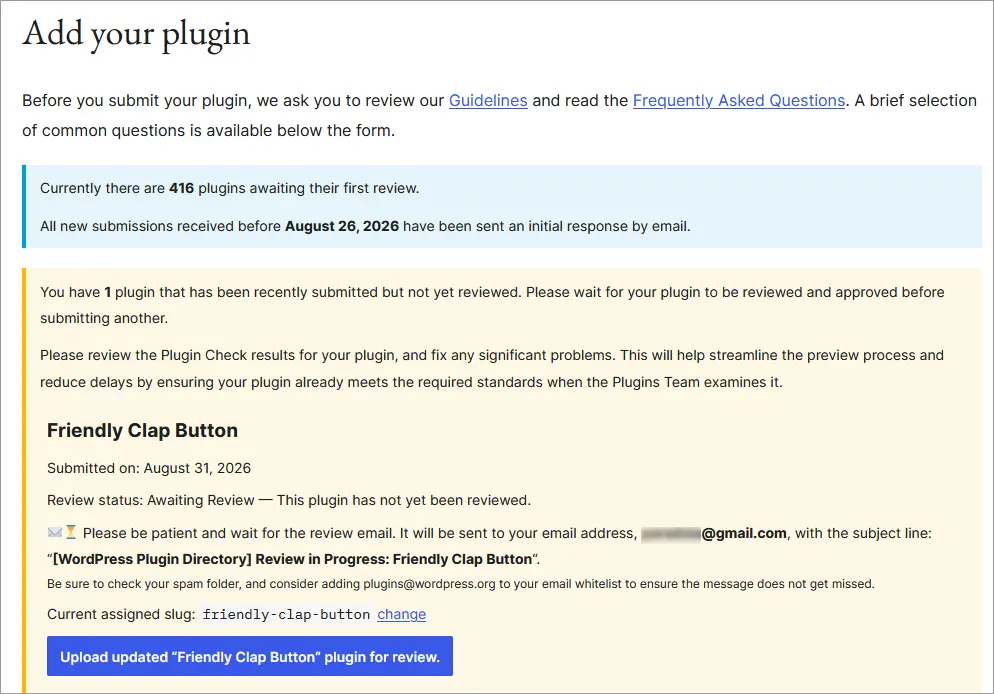
It looks like all I can do from here is wait patiently 😅
The version currently running on this site is “Friendly Clap Button 1.0.0,” the version that is under review.