- Introduction: Verifying Fitbit Air Multi-Device Pairing on Google Health App
- Fitbit Air vs. Charge 6 Ankle Test: The Forced Device Swapping Trap
- Fitbit Air vs. Galaxy Watch 7: Why Google Restricts Multi-Device Pairing
- The Hidden Truth: Google’s Marketing vs. Fitbit Help Page Realities
- Final Verdict: Why Fitbit Air is Exclusively for Pixel Watch Users
Introduction: Verifying Fitbit Air Multi-Device Pairing on Google Health App
Many gadget enthusiasts dream of a multi-device wear routine—wearing a feature-rich smartwatch during the day and switching to a lightweight tracker at night. However, attempting this seamless transition with Google’s latest Fitbit model, the “Fitbit Air,” reveals a fatal system architecture barrier completely omitted from the official product sales pages. 😭💦
Based on hands-on verification and practical testing, this report exposes the rigid multi-device limitations within the Google Health app and uncovers the inconvenient truths hidden beneath Google’s marketing campaign. 🔍✨
Fitbit Air vs. Charge 6 Ankle Test: The Forced Device Swapping Trap
The issue came to light when trying to add the screenless, ultra-lightweight Fitbit Air to an account already paired with a primary Fitbit Charge 6 tracker. 💪
The goal was simple: wear the Charge 6 on the wrist during active hours, switch to the comfortable Fitbit Air worn on the ankle at night, and let the Google Health app automatically merge step counts and health metrics into a single profile. ✨
However, the moment the “Add Device” process was initiated, the app displayed a cold, uncompromising system message that completely shattered those multi-device expectations. 😱💥
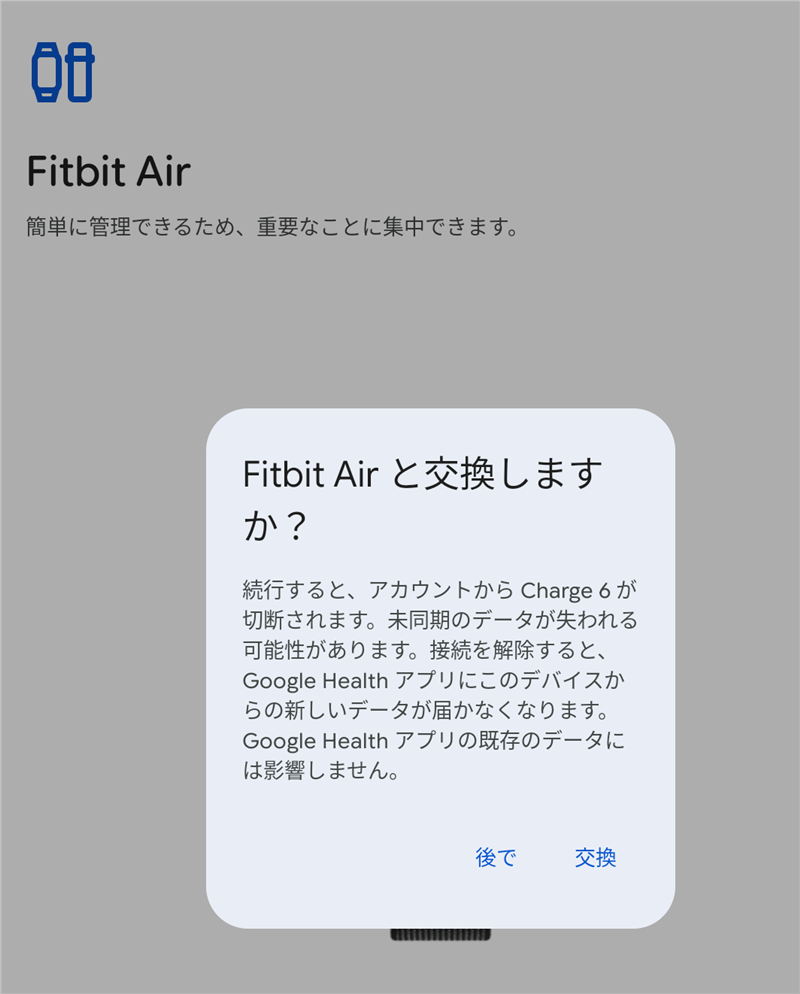
Instead of genuinely “adding” a secondary device, the setup button functions strictly as a forced overwrite and replacement mechanism. The system instantly demands the removal of the existing Charge 6. In short, keeping both a Charge 6 and a Fitbit Air active on a single account is fundamentally blocked by design! 😡💥
Fitbit Air vs. Galaxy Watch 7: Why Google Restricts Multi-Device Pairing
Tech-savvy users might point out that Samsung handles this effortlessly: the Galaxy Wearable app allows users to pair a Galaxy Watch 7 and a Galaxy Fit 3 simultaneously, utilizing an elegant “Auto Switch” feature. Why does Google fail where Samsung succeeds? The answer lies in how ecosystems categorize their hardware. 🤔
| Brand | 👍 Supported Multi-Device Combinations | ❌ Combinations Resulting in Forced Overwrite |
|---|---|---|
| Google (Fitbit) | One Smartwatch (Pixel Watch only) + One Fitbit Tracker | Multiple Trackers (Air + Charge 6) are Strictly Blocked |
| Samsung (Galaxy) | One Smartwatch + One Fitness Band (Galaxy Fit 3) | Multiple identical watches or multiple identical bands are Blocked |
Samsung’s Auto Switch works perfectly because its platform recognizes the smartwatch and the fitness band as entirely separate product categories. If you were to try pairing two Galaxy Fit 3 bands to one phone, Samsung would reject it just like Google does. 💡
The problem with Google’s ecosystem is that regardless of form factor, the Charge 6 and the screenless Air are lumped into the exact same “Tracker” category. Because the current Google Health app enforces an absolute rule of “only one tracker synced per account at a time,” any practical day-and-night tracker rotation is completely locked out. 😭💔
The Hidden Truth: Google’s Marketing vs. Fitbit Help Page Realities
The core issue here is Google’s misleading marketing strategy. The Google Store purchase pages prominently highlight the luxury of multi-device wear, alluring buyers with the concept of seamless device switching throughout the day. 💢
Yet, the critical limitation—that adding a new tracker completely purges your existing tracker from the account—is never mentioned on the storefront. Instead, this ironclad restriction is buried deep within the fine print of the Fitbit Help Center pages, far out of sight for the average consumer. 👀
Even worse, this policy completely alienates users holding onto legacy Fitbit hardware. Even if you own a legitimate smartwatch like the Fitbit Versa 4 or Fitbit Sense 2, Google treats them as part of the older Fitbit OS infrastructure, pushing them into the same restricted category as basic trackers. Consequently, trying to pair a Versa 4 alongside the new Fitbit Air triggers the exact same unyielding replacement error. 💀❌
It is difficult not to see this as a deliberate architectural choice to strip utility away from loyal, long-time Fitbit users, aggressively maneuvering them into purchasing a premium Google Pixel Watch instead.
Final Verdict: Why Fitbit Air is Exclusively for Pixel Watch Users
After analyzing real-world behavior alongside official documentation, the structural reality of this ecosystem becomes undeniable. ✨
The screenless Fitbit Air is a highly restricted accessory that only offers true value to existing Google Pixel Watch series users looking for a lightweight sleep tracker. 💡
Google has granted an exclusive VIP synchronization rule solely to Wear OS-powered Pixel Watches, permitting them to coexist alongside a standard Fitbit tracker. If you currently rely on a Charge 6, or if you are happily utilizing a dedicated Fitbit smartwatch like the Versa 4, buying into Google’s beautiful marketing for the Fitbit Air will only result in disappointment. The app will refuse to let them coexist, reducing your new purchase to a mere replacement device. 💀💔
Fitbit fans worldwide should tread carefully around Google’s deceptive multi-device pairing claims. Unless you are fully committed to the Pixel Watch ecosystem, sticking with your current standalone tracker remains the smartest, most frustration-free choice available. 👍
![[1-Week Ankle Test] What I Learned from Fitbit Air vs. Charge 6 Validation](https://martto.net/en/wp-content/uploads/2026/06/eye_catch_fitbitair_ankle5.jpg "[1-Week Ankle Test] What I Learned from Fitbit Air vs. Charge 6 Validation")
Comments