🇺🇸 English
今回は、Cocoon標準のサイトマップでできることを確認しながら、サイトマップを全自動化して、自分のサイトに合わせてカスタマイズする方法を紹介します。
なお、ここで扱うのは検索エンジンに送信するXMLサイトマップではなく、読者がサイト内の記事を探すためのHTMLサイトマップです。
Cocoonならサイトマップを簡単に作れる
Cocoonでは、固定ページにサイトマップ用のショートコード [sitemap] を入力するだけで、サイト内の記事を一覧表示できます。
標準の状態でも、主に次のような内容を表示できます。
- 固定ページ
- 通常投稿
- カテゴリー一覧
新しい記事を公開するとサイトマップにも自動で反映されるため、記事を追加するたびにリンクを書き足す必要はありません。
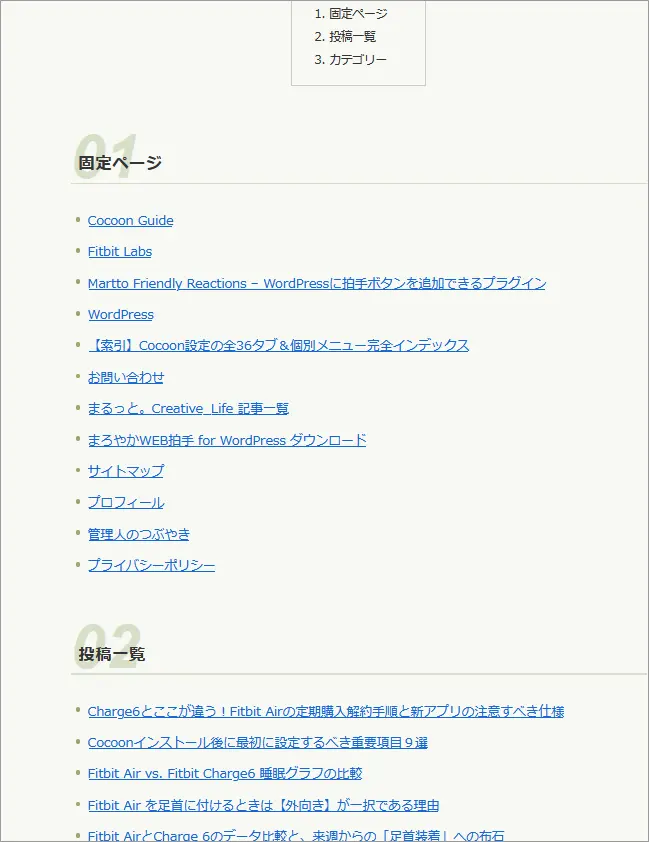
上の画像は、Cocoonの標準機能で表示したサイトマップです。
必要な情報はきちんと並んでいますが、投稿一覧は古い記事順になっていますし、記事数が増えてくるとリンクが長く続き、必然的に目的の記事を探しにくくなってしまいます。
また、通常投稿とは別にカスタム投稿を使っているサイトでは、その記事もサイトマップに載せたいところです。
サイトマップに追加すると便利な機能
せっかくサイト全体の記事を一覧できるページを作るなら、読者が探しやすく、自分自身もサイトの構成を確認しやすいページにしておきたいものです。
たとえば、次のようなカスタマイズができます。
- 通常投稿だけでなくカスタム投稿も表示する
- 固定ページ・投稿・カスタム投稿などの表示順を決める
- 必要な項目だけを表示する
- 新しい記事を公開すると自動でサイトマップにも追加する
一度仕組みを作ってしまえば、その後は記事を公開するたびにサイトマップを手作業で更新する必要がありません。
サイトマップそのものを全自動化にしておくと、記事が増えても管理が楽になります。
デザインを整えると記事を探しやすくなる
サイトマップは、ただリンクが並んでいればよいというものでもありません。
固定ページ、通常投稿、カスタム投稿などの区切りを分かりやすくしたり、項目同士の間隔を調整したりするだけでも、ずいぶん見やすくなります。
たとえば、次のような部分を調整できます。
- 各項目の見出しを分かりやすくする
- 記事タイトル同士の間隔を調整する
- カテゴリーを見つけやすくする
- PCでは横に並べ、スマートフォンでは1列で表示する
- サイト全体のデザインに合わせて色や余白を整える
サイトマップは記事を探すためのページなので、凝ったデザインにする必要はありません。
どこに何があるのかがひと目で分かることを優先すると、使いやすいページになります。
まるっと。Creativeのカスタマイズを紹介
当サイト「まるっと。Creative」でも、以前はCocoon標準のサイトマップを使用していました。
現在は、通常投稿や固定ページだけでなく、カスタム投稿も含めて自動で表示するサイトマップに変更しています。
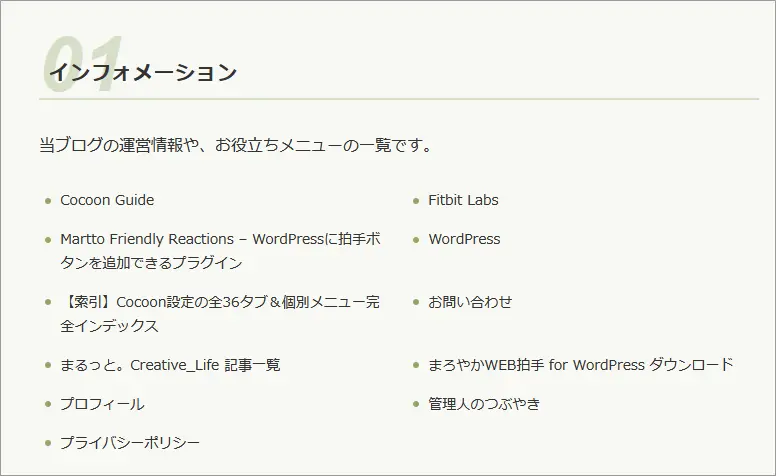
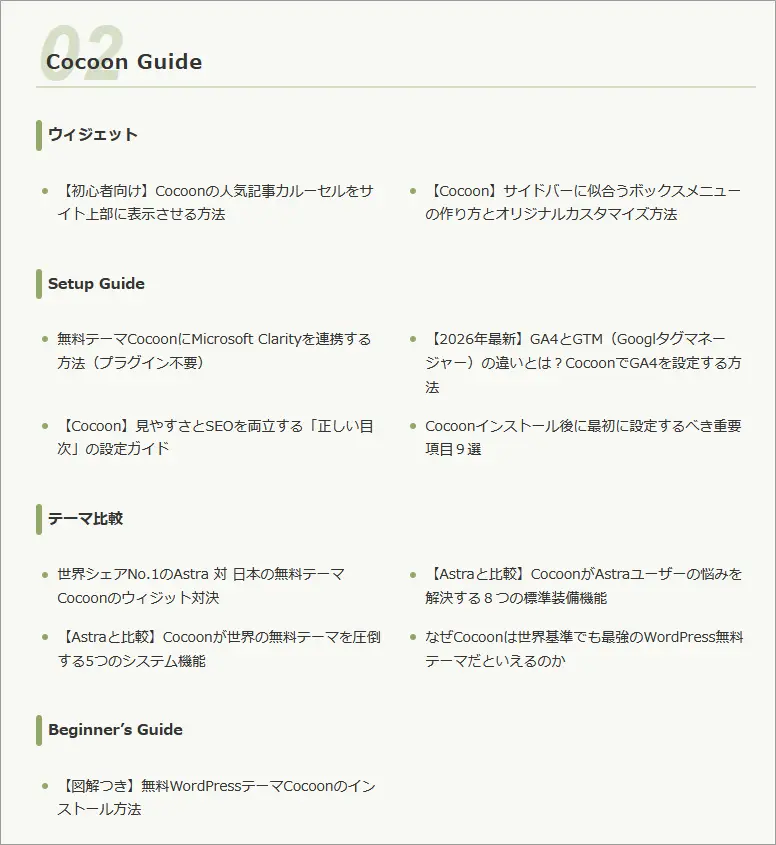
一度仕組みを作ってしまうと、記事を公開するだけで自動で一覧に追加されるため、サイトマップを更新する作業は必要ありません。
さらに、表示する項目の順番を決め、CSSで見た目を整えることで、標準のサイトマップよりもサイト全体を確認しやすくなります。
当サイトのサイトマップでは見出し2は[カテゴリー]、見出し3は[タグ]に設定しています。そのため、記事が複数のカテゴリーやタグにまたがらないよう、気をつけるようにしています。
もちろん、この形がすべてのサイトにとって正解というわけではありません。
「カスタム投稿も載せたい」「この項目を先に表示したい」「もっとシンプルにしたい」など、自分のサイトに必要なものを選んで作れるのがカスタマイズのよいところです。
全自動サイトマップはfunctions.phpとCSSで作れる
では、このようなサイトマップをどのように作っているのでしょうか。
大きく分けると、次の2つを使っています。
- functions.php:サイトマップに何を表示するかを決める
- CSS:サイトマップの見た目を整える
functions.phpでは、固定ページ、通常投稿、カテゴリー、カスタム投稿など、サイトマップに表示したい内容を指定します。
そしてCSSでは、見出しのデザインや余白、並び方などを調整します。
当サイトで使用しているコードを参考例として掲載します。
-
// 通常投稿・固定ページ・カスタム投稿対応 全自動サイトマップ
function custom_complete_auto_sitemap() {
    $output = '<div class="custom-sitemap-wrapper">';
    // 固定ページ
    $output .= '<h2 class="custom-sitemap-h2">インフォメーション</h2>';
    $output .= '<p>当ブログの運営情報や、お役立ちメニューの一覧です。</p>';
    $current_page_id = get_queried_object_id();
    $front_page_id   = (int) get_option('page_on_front');
    $exclude_page_ids = array_filter(array(
        $current_page_id,
        $front_page_id,
    ));
    $pages = get_pages(array(
        'post_status' => 'publish',
        'sort_column' => 'menu_order,post_title',
        'sort_order'  => 'ASC',
        'exclude'     => $exclude_page_ids,
    ));
    if (!empty($pages)) {
        $output .= '<ul class="custom-sitemap-list">';
        foreach ($pages as $page) {
            $output .= '<li><a href="' . esc_url(get_permalink($page->ID)) . '">'
                . esc_html($page->post_title)
                . '</a></li>';
        }
        $output .= '</ul>';
    }

    // 通常投稿:カテゴリー → タグ → 記事
    $ordered_category_slugs = array(
        'cocoon-guide',
        'wordpress',
        'fitbit-labs',
    );
    foreach ($ordered_category_slugs as $category_slug) {
        $category = get_category_by_slug($category_slug);
        if (!$category) {
            continue;
        }
        $output .= '<h2 class="custom-sitemap-h2">'
            . esc_html($category->name)
            . '</h2>';
        $posts = get_posts(array(
            'category'       => $category->term_id,
            'posts_per_page' => -1,
            'orderby'        => 'date',
            'order'          => 'DESC',
            'post_status'    => 'publish',
        ));
        if (empty($posts)) {
            continue;
        }
        $tag_ids = array();
        foreach ($posts as $p) {
            $post_tags = get_the_tags($p->ID);
            if ($post_tags) {
                foreach ($post_tags as $tag) {
                    $tag_ids[] = $tag->term_id;
                }
            }
        }
        $tag_ids = array_unique($tag_ids);
        if (!empty($tag_ids)) {
            foreach ($tag_ids as $tag_id) {
                $tag = get_tag($tag_id);
                if (!$tag) {
                    continue;
                }
                $output .= '<h3 class="custom-sitemap-h3">'
                    . esc_html($tag->name)
                    . '</h3>';
                $tagged_posts = get_posts(array(
                    'category'       => $category->term_id,
                    'tag_id'         => $tag_id,
                    'posts_per_page' => -1,
                    'orderby'        => 'date',
                    'order'          => 'DESC',
                    'post_status'    => 'publish',
                ));
                if (!empty($tagged_posts)) {
                    $output .= '<ul class="custom-sitemap-list">';
                    foreach ($tagged_posts as $tp) {
                        $output .= '<li><a href="' . esc_url(get_permalink($tp->ID)) . '">'
                            . esc_html($tp->post_title)
                            . '</a></li>';
                    }
                    $output .= '</ul>';
                }
            }
        } else {
            // タグがないカテゴリーは記事をそのまま表示
            $output .= '<ul class="custom-sitemap-list">';
            foreach ($posts as $p) {
                $output .= '<li><a href="' . esc_url(get_permalink($p->ID)) . '">'
                    . esc_html($p->post_title)
                    . '</a></li>';
            }
            $output .= '</ul>';
        }
    }

    // カスタム投稿 luxe「管理人のつぶやき」
    if (post_type_exists('luxe') && taxonomy_exists('luxe_cat')) {
        $luxe_term = get_term_by(
            'slug',
            'managers-tweets',
            'luxe_cat'
        );
        if ($luxe_term && !is_wp_error($luxe_term)) {
            $args = array(
                'post_type'      => 'luxe',
                'posts_per_page' => -1,
                'post_status'    => 'publish',
                'orderby'        => 'date',
                'order'          => 'DESC',
                'tax_query'      => array(
                    array(
                        'taxonomy' => 'luxe_cat',
                        'field'    => 'slug',
                        'terms'    => 'managers-tweets',
                    ),
                ),
            );
            $query = new WP_Query($args);
            if ($query->have_posts()) {
                $output .= '<h2 class="custom-sitemap-h2">'
                    . esc_html($luxe_term->name)
                    . '</h2>';
                $output .= '<ul class="custom-sitemap-list">';
                while ($query->have_posts()) {
                    $query->the_post();
                    $output .= '<li><a href="' . esc_url(get_permalink()) . '">'
                        . esc_html(get_the_title())
                        . '</a></li>';
                }
                $output .= '</ul>';
                wp_reset_postdata();
            }
        }
    }

    $output .= '</div>';
    return $output;
}
add_shortcode('auto_sitemap', 'custom_complete_auto_sitemap');
このコードは「まるっと。Creative」のサイト構成に合わせて作成したものです。
特にカスタム投稿は、サイトによって投稿タイプ名が異なります。そのため、掲載したコードをそのままコピーするのではなく、自分のサイト構成に合わせた調整が必要です。
デザインについても同じです。
-
/* 自動サイトマップ専用スタイル */
#main .entry-content .custom-sitemap-wrapper {
    margin-top: 30px;
}

/* h2見出し */
#main .entry-content .custom-sitemap-wrapper h2.custom-sitemap-h2 {
    font-size: 20px;
    color: #333333;
    background: transparent;
    padding: 0 0 8px 0;
    margin: 50px 0 25px 0;
    border: none;
    border-bottom: 2px solid #78909c;
    border-radius: 0;
    display: flex;
    align-items: center;
}
#main .entry-content .custom-sitemap-wrapper h2.custom-sitemap-h2::before {
    content: "\f24d";
    font-family: "Font Awesome 5 Free";
    font-weight: 900;
    color: #333333;
    margin-right: 10px;
    font-size: 18px;
}

/* h3見出し */
#container #content #main .entry-content .custom-sitemap-wrapper h3.custom-sitemap-h3 {
    font-size: 15px;
    color: #333333;
    padding: 6px 12px;
    margin: 30px 0 15px 0;
    border: none;
    border-radius: 4px;
    display: flex;
    align-items: center;
}
#main .entry-content .custom-sitemap-wrapper h3.custom-sitemap-h3::before {
    content: "\f02b";
    font-family: "Font Awesome 5 Free";
    font-weight: 900;
    color: #333333;
    margin-right: 6px;
    font-size: 14px;
}

/* 記事・固定ページ一覧 */
#main .entry-content .custom-sitemap-wrapper .custom-sitemap-list {
    display: flex;
    flex-wrap: wrap;
    justify-content: space-between;
    list-style: none;
    padding: 0;
    margin: 0 0 30px 0;
}
#main .entry-content .custom-sitemap-wrapper .custom-sitemap-list li {
    width: 48%;
    margin-bottom: 10px;
    padding-left: 15px;
    position: relative;
    box-sizing: border-box;
    line-height: 1.5;
}
#main .entry-content .custom-sitemap-wrapper .custom-sitemap-list li::before {
    content: "›";
    font-size: 16px;
    font-weight: bold;
    position: absolute;
    left: 0;
    top: 0;
    line-height: 1.5;
    color: #78909c;
}
#main .entry-content .custom-sitemap-wrapper .custom-sitemap-list li a {
    text-decoration: none;
    color: #333333;
    font-size: 14px;
    display: block;
}
#main .entry-content .custom-sitemap-wrapper .custom-sitemap-list li a:hover {
    color: #000000;
    text-decoration: underline;
}

/* スマホでは1列表示 */
@media screen and (max-width: 480px) {
    #main .entry-content .custom-sitemap-wrapper .custom-sitemap-list li {
        width: 100%;
    }
}
使用しているテーマや現在のCSSによって、必要な指定は変わります。
難しいコードを自分で書かなくても大丈夫
ここまで読んで、
「functions.phpなんて分からない」
「カスタム投稿タイプ名と言われても、どこを見ればいいのか分からない」
「CSSを自分で書くのは無理そう」
と思った方もいるかもしれません。
でも、この難しい部分をすべて自分で書けるようになる必要はありません。
今はAIに、現在のコードや自分が作りたいサイトマップのイメージを伝えて、自分のサイトに合わせたコードへ書き換えてもらうことができます。
大切なのは、プログラムを書く技術よりも、「自分は何をしたいのか」をAIに伝えることです。
次回は、今回のサイトマップを題材にして、
- コードをどのようにAIへ見せるのか
- 自分のサイト用に変更してもらうには何を伝えるのか
- 言葉で説明しにくいときに、スクリーンショットをどう使うのか
- 手書きの完成図を使って希望を伝える方法
など、WordPress初心者でも迷わないAIへの頼み方を紹介します。
コメント Leave a Comment