A Comprehensive Review of Astra: The World’s No.1 WordPress Theme
When running a WordPress site, we often take it for granted that we can place blog parts anywhere we like via the widget screen. However, looking deeper into the reality, I realized that Cocoon is built with an incredibly thoughtful, over-delivering design that completely redefines the boundaries of a “free theme.”
I recently installed and tested “Astra”—the globally popular free theme boasting an enormous market share—to experience its features firsthand. The results gave me a massive culture shock, revealing a design philosophy 180 degrees different from Japanese free themes. Here is my objective, data-backed verification report.
The Reality of Astra’s Initial Setup Wizard Screen
Immediately after installing and activating Astra on a fresh site, the following setup wizard screen dominates the dashboard:

At first glance, this looks like a user-friendly navigation interface that intuitively lets you choose between “AI site generation” or “professional starter templates.” However, if a beginner unfamiliar with WordPress proceeds here, they are forced into a detailed English questionnaire. As a result, placeholder demo articles, images, and multiple heavy plugins are automatically installed in the background—creating a bloated onboarding trap.
On the other hand, Cocoon grants you a clean, intuitive, and fully functional dashboard the exact second you activate it. Right from the starting line, the difference in user hospitality is night and day.
Astra Free Only Offers a Handful of Widget Insertion Areas
To reveal Astra’s core layout flexibility, I bypassed the default Gutenberg block widget view and reverted to the classic text-editor-style widget manager. Here is the actual screen:
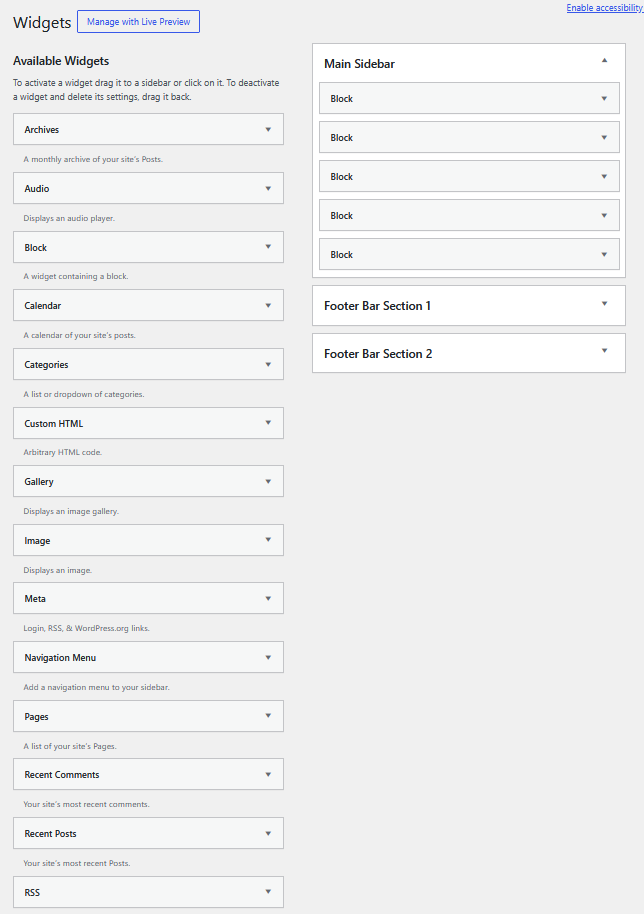
As you can clearly see, the available insertion zones are strictly limited to the “Main Sidebar” and “Footer Areas.” It is an incredibly restricted canvas.
In sharp contrast, look at how many widget options and placement zones the Japanese free theme Cocoon provides out of the box:
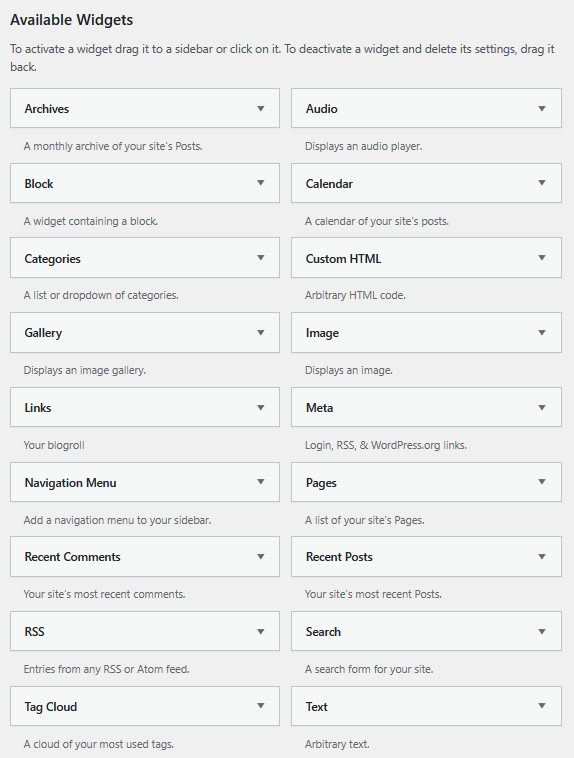
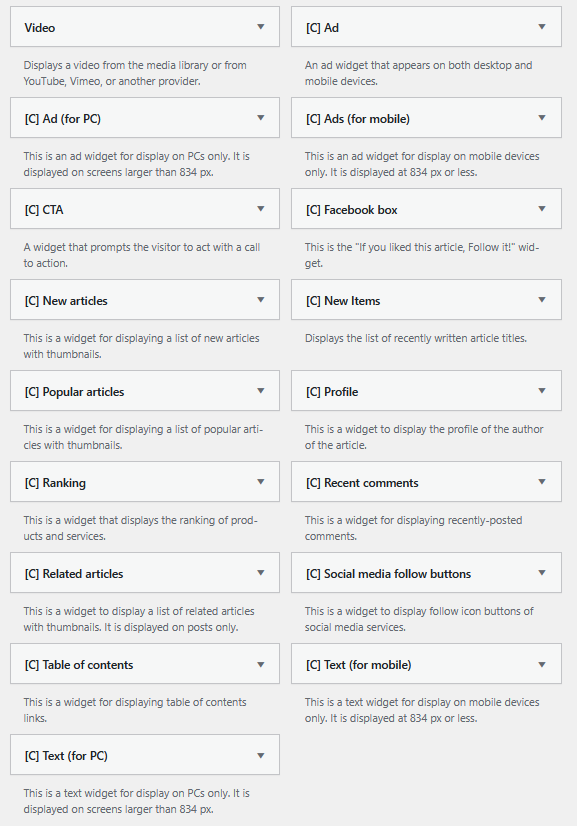
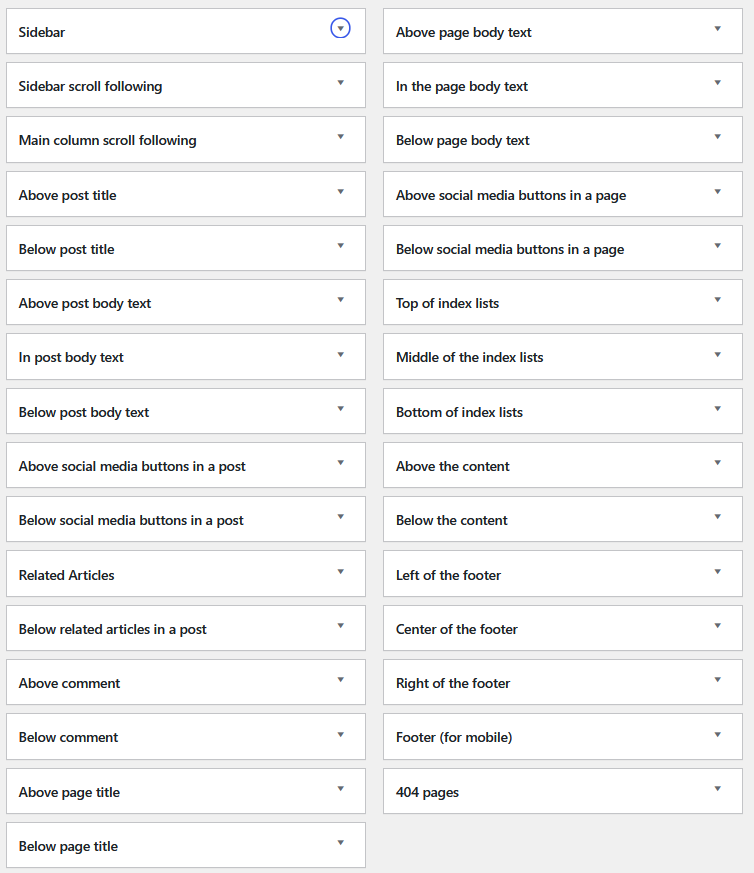
Strategic premium spots highly valued by bloggers—such as “In-Post Body Content” or “Index List Top” for optimized homepage monetization—simply do not exist in the free version of Astra. If you want to insert an ad banner or a custom element in the middle of a post in Astra, you are forced to either bloat your site with a page builder plugin like Elementor, or manually hardcode custom hooks directly into the theme’s template files.
Some users might think, “Having too many unused widgets just clutters my dashboard.” But the brilliant part about Cocoon is its built-in settings manager, which allows users to easily toggle off and hide any unused widgets manually. It is a brilliant free theme that genuinely understands the beauty of subtraction!
[Feature Comparison] Astra vs Cocoon Layout Structure
The table below highlights the core differences in layout freedom and ease of management between the two themes:
| Verification Item | Global Standard Theme “Astra (Free Version)” |
Japanese Free Theme “Cocoon” |
|---|---|---|
| Standard Widget Areas | Only 3 to 6 zones | 35 distinct zones open by default |
| Plugin Dependency | Requires Page Builders for flexible placement | 100% Plugin-Free for advanced layouts |
| Child Theme Setup | Requires external generation via web tool | Parent & Child zip files bundled on official site |
In the global WordPress ecosystem, building such a flexible layout system usually requires spending dozens of dollars annually on premium themes like Divi or Avada, or stacking multiple plugins while accepting the risk of slower page speeds.
The Ultimate Functional Beauty of Cocoon: Achieving Clean Layouts with Zero Extra Costs
Against the global standard “DIY philosophy”—where you are expected to build everything yourself via code or external plugins—Japan’s Cocoon takes a completely luxurious approach, delivering the exact features bloggers need, pre-optimized by the core system, 100% free of charge. It is a masterpiece that beautifully condenses the essence of Japanese user-first hospitality (Omotenashi).
By building a live test site and directly comparing the core frameworks, I proved exactly how privileged and advanced Cocoon’s 35 default widget areas truly are. For international creators looking to optimize workflow and page speed, experiencing this meticulously thought-out architecture is highly recommended.

Comments